Cloud cost intelligence for lean technical teams

Know what changed while there is still time to act

Mosaic is pre-beta. At launch, it will bring cloud and AI spending into one view for lean teams without dedicated FinOps staff. It will help them spot meaningful cost changes, add trend and budget context, and route details to the person who can act.

Join the waitlist to register your interest in future beta access.

Join Beta
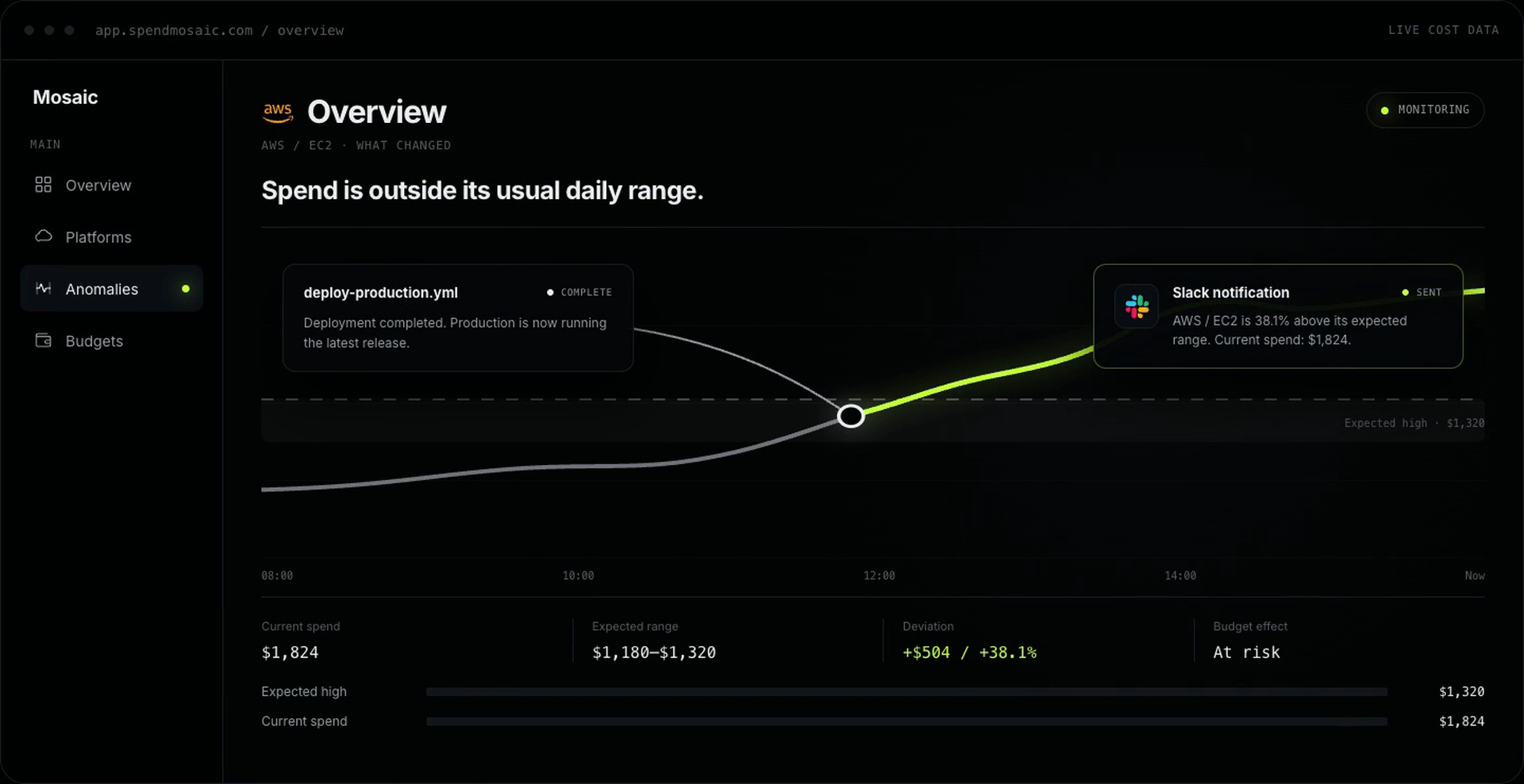
A production deployment completes, AWS EC2 spend rises from the expected high of $1,320 to $1,824, Mosaic flags the $504 or 38.1% anomaly and budget risk, then sends the alert to Slack.

A monthly total is not the full answer

A provider bill can show what was charged, but a lean team may still need to determine which platform, service, region, SKU, or AI model changed—and whether that movement puts the monthly budget at risk.

Mosaic is being built to make those questions easier to investigate without requiring an enterprise FinOps program. It will support a focused operating habit: see the movement, understand its context, and bring the right person into the conversation.

New to the discipline? Read What is FinOps? A practical introduction for lean technical teams.

  1. 01

    See the movement

    Track spend across the services and platforms your team relies on.

  2. 02

    Understand the signal

    Compare a change with a baseline you control, then investigate it in context.

  3. 03

    Put it in the technical rhythm

    Send the service, amount, baseline, and deviation to Slack or email, so team leads can treat a cost change as an operational signal, not a finance escalation.

The Mosaic loop

From cost data to the next useful action

  1. 01 / ConnectA verified read-only connection between a cloud and a shield

    Connect with control

    First, a team will connect its cost sources. AWS accounts will connect through a revocable, read-only CloudFormation IAM role. Mosaic will also monitor connector freshness, ingestion runs, and configuration errors so teams can recognize when the available data needs attention.

  2. 02 / SeeA cost trend crossing its expected range under a magnifying lens

    See what changed

    Next, Mosaic will bring current and historical billing data into a shared view. Teams will be able to examine trends at the level relevant to an investigation and review historical cost events that Mosaic would have detected.

  3. 03 / BringOne anomaly signal routed to chat and email notifications

    Bring it into the technical rhythm

    Then, configurable baselines and sensitivity will help identify unusual daily spending. Monthly budget thresholds and end-of-month projections will add financial context to the change.

  4. 04 / OperateA recurring operating loop surrounding improving cost bars

    Make cost a technical operating habit

    Finally, contextual alerts will go to Slack or email, helping route the platform, amount, baseline, deviation, and budget context to someone who can investigate. Mosaic will surface the signal; the team will still decide what the change means and what action, if any, to take.

The ecosystem Mosaic is building for

The costs your stack runs on, in one place.

Mosaic is being built around the cloud and AI platforms that shape a technical team’s cost picture, so the next useful answer does not live in six different dashboards.

Connector coverage

06
  • AWSCloud
  • Google CloudCloud
  • VercelPlatform
  • OpenAIAI
  • AnthropicAI
  • GitHubSource

Coverage will grow with the product. These are the platforms in scope today.

What Mosaic will offer at launch

  • One dashboard for AWS, GCP, OpenAI, Anthropic, GitHub, and Vercel spending
  • Cost-trend analysis by platform, service, region, SKU, and AI model
  • Detection of unusual daily spending using configurable baselines and sensitivity
  • Monthly budget tracking with thresholds and end-of-month projections
  • Contextual anomaly and budget alerts through Slack and email
  • Provider-cost reporting in the company’s preferred currency, with exchange-rate provenance
  • AWS connections through a revocable, read-only CloudFormation IAM role
  • Historical billing imports showing cost events Mosaic would have detected
  • Monitoring for connector freshness, ingestion runs, and configuration errors
  • Support for technical teams in English and Brazilian Portuguese

Cost context without the enterprise overhead

Mosaic’s launch focus is deliberately narrow: help lean technical teams explain cost changes and route the resulting context without adding enterprise complexity. It will not replace engineering or financial judgment, automatically prove that an increase is waste, or guarantee savings. For AWS, its read-only connection will not change infrastructure.

A cost change can reflect growth, a deployment, a configuration issue, or another operational decision. The people responsible for the system will still need to interpret the available context, determine whether a response is necessary, and choose the appropriate action.

That boundary matters. Mosaic will be designed to make changes easier to see and discuss, not to make operational decisions on a team’s behalf. Configurable anomaly detection can identify movement relative to a chosen baseline, while budgets and projections can show how that movement relates to the month. Neither signal alone establishes that spending is unnecessary.

One view for cloud, AI, and business reporting

Technical teams may need to understand costs that sit across infrastructure, application platforms, source-control services, and AI providers. At launch, Mosaic will bring the supported providers into one dashboard while preserving the detail needed to investigate by platform, service, region, SKU, or AI model.

For companies that plan and report in a currency different from a provider’s billing currency, Mosaic will report provider costs in the company’s preferred currency and include exchange-rate provenance. This will help technical and business stakeholders discuss the same movement in the currency used for operational and financial decisions.

Early access

Register your interest in the beta

Mosaic is not available yet, and joining the waitlist will not provide immediate access or establish a launch date. It will register your interest in future beta access.

If your team wants a focused way to bring cloud and AI cost changes into its operating rhythm, join the waitlist.

We will use your email only to contact you about Mosaic beta access.

FAQ

How does Mosaic help technical teams?

Mosaic is built to help technical leads see the cost trends behind the systems they own, understand the cause of meaningful movement, and bring that context into the team’s operating rhythm. It is not a finance report handed to engineering after the fact.

What does Mosaic read from AWS?

At launch, Mosaic will use the read-only role to verify access and retrieve cost data. It will not store long-lived AWS credentials, and it will not be able to make changes to your AWS infrastructure. You will be able to revoke access by deleting the role.

Why does reporting currency matter?

A cloud provider may bill in USD while the company plans, reports, and measures margin in another currency. Mosaic keeps the original charge and reporting value together so the team can see both the provider bill and the business effect.